What Is a Hotel PMS? A Complete Guide for Hotel Owners
A hotel PMS, or property management system, is software that helps a hotel manage reservations, room availability, guests, front desk operations, housekeeping, billing and reporting in one connected place.
For an owner, its purpose is straightforward: know who is arriving, which rooms are ready, what guests owe and how the property is performing without rebuilding the picture from spreadsheets, messages and paper records.
This guide explains the essentials, follows an example guest through a stay, and gives you practical questions to ask before choosing a system. It is published by Diyafa Cloud, a hotel PMS provider; our product is introduced separately below. Features vary between providers, so this is a buying guide, not a promise that every PMS includes every capability.
What Is a Hotel PMS?#
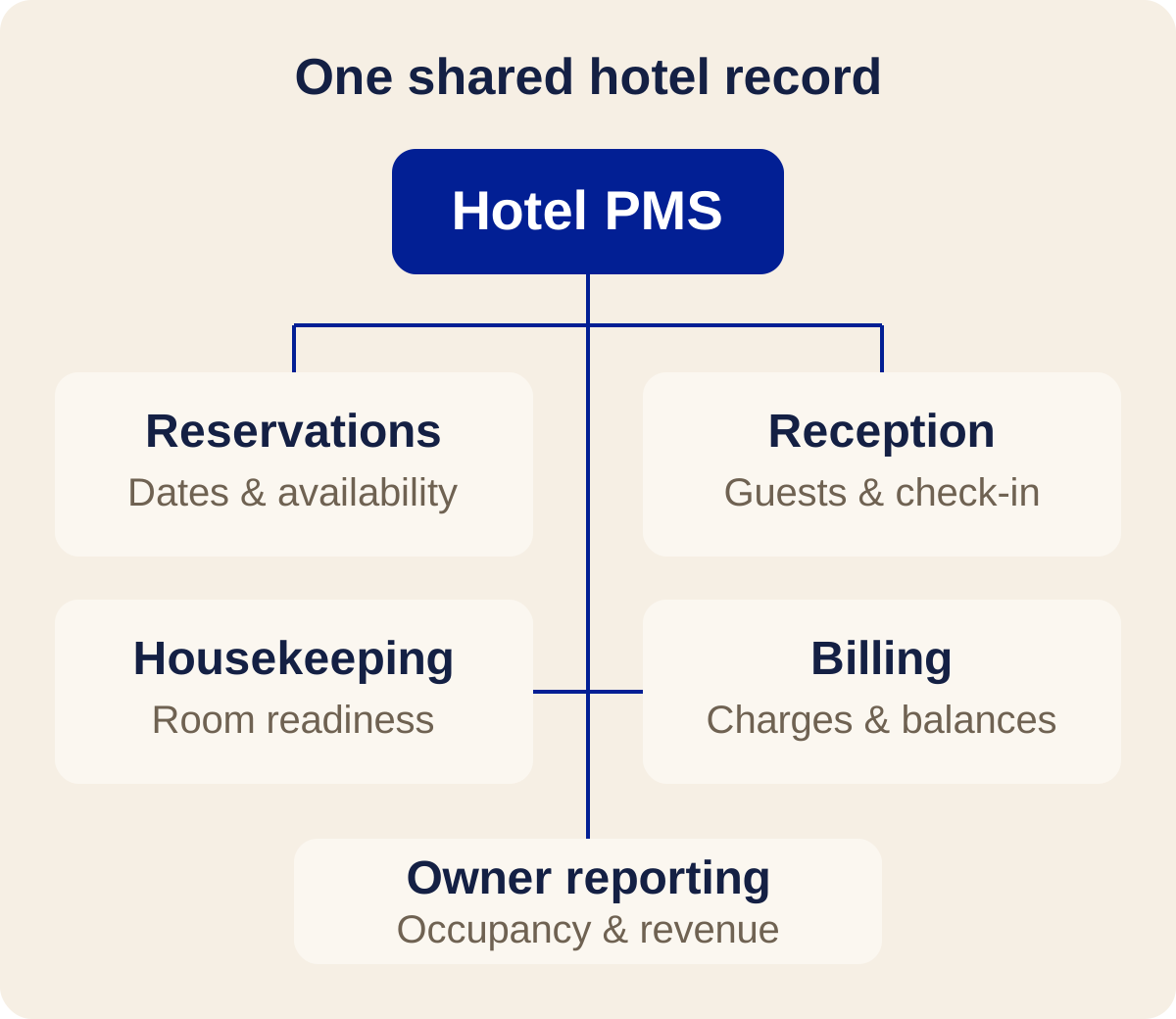
Think of a PMS as the hotel's shared operational record. A reservation connects a guest with dates, inventory, rates and billing. Reception, housekeeping and management then work with related information rather than separate versions of the same booking.
The term does not mean a booking website, a payment gateway or a channel manager. Those tools have different jobs, although they may connect to a PMS or be bundled with one.
For industry context, Oracle's overview of hotel property management systems describes the PMS around front-office tasks such as reservations, check-in, check-out and room assignment, alongside connected hotel operations.
The useful test is not how many screens a system has. It is whether staff can complete a normal shift without copying the same information from one place to another.
What Does a Hotel PMS Do?#
Reservations and availability#
A PMS keeps bookings and inventory organized by date. Staff should be able to create a reservation, change dates, assign a room, record a cancellation and see the effect on availability.
Room types and physical rooms are not interchangeable. A guest might book a double room category before reception assigns room 204. Ask how the system handles both, including rooms temporarily unavailable for maintenance.
Online bookings enter automatically only when the relevant booking engine, channel manager or provider connection is supported and configured. Otherwise, staff may need to enter them manually.
Guest records and front desk work#
Guest records connect contact details and stay information to a reservation. Arrival, in-house and departure lists help reception organize the day; check-in and check-out update the operational status of a stay.
If you accept company or travel-agency business, also check whether the system distinguishes the person staying from the organization responsible for payment. A guest profile alone is not always enough.
Housekeeping and room status#
Housekeeping functions show which rooms need cleaning, which are ready and which are unavailable. Staff can coordinate departures, cleaning and arrivals without assuming that an unoccupied room is ready to sell.
Ask to see a room after check-out. Does it become dirty? Who can mark it clean or inspected? Can reception see that change without asking someone to send a message?
Billing and payments#
A PMS may organize room charges, extras, deposits, balances and invoices. Some systems also connect to payment processors; others primarily record payments made elsewhere.
Recording a card payment is not the same as processing one. Confirm payment-provider availability, settlement arrangements and fees separately. Never assume that buying a PMS automatically gives you online card acceptance.
Owner and manager reporting#
Reports help owners review occupancy, room revenue, booking sources and outstanding balances. Their value depends on consistent inputs and clear definitions.
For example, cash collected today is not necessarily revenue earned today: a deposit for a future stay may appear in collections before the stay takes place. Ask which date and basis each report uses before comparing it with your accounts.
How Does a Hotel PMS Work?#
Consider an illustrative two-night stay at a 12-room boutique hotel. This is a fictional workflow, not a customer case study or a claim about measured results.
- Reservation: A guest books a double room for two nights. Reception enters the dates, rate, guest details and any deposit. If a compatible online connection is active, the reservation may arrive through that connection instead.
- Before arrival: Reception reviews the arrival list and assigns a suitable room. Housekeeping checks its readiness. If the room is unavailable, staff resolve the assignment before the guest reaches the desk.
- Check-in: Reception verifies the required details, checks the booking and payment position, and marks the guest in house. A request for early arrival does not override the need for a ready room.
- During the stay: Authorized staff record additional charges and update relevant stay details. If the guest changes rooms or extends the stay, reception checks inventory and adjusts the reservation and billing.
- Check-out: Reception reviews the final charges, applies deposits and recorded payments, resolves the remaining balance, and completes departure. The room returns to the housekeeping workflow before the next arrival.
- Owner review: Management checks the stay's charges, collections and booking source in the relevant reports. Exceptions, such as an unpaid company account, remain visible for follow-up.
The connection between these steps matters more than any individual screen. A date change should not leave housekeeping working from yesterday's departure list or billing using the old length of stay.
Who Needs a PMS?#
A PMS can be useful wherever accommodation inventory, guest stays and payments need coordinated management. The right fit depends on the operation, not simply the number of rooms.
- Independent hotels: Look for clear shift handovers, room allocation, billing and access for different staff roles.
- Boutique hotels: Check how staff record preferences and special arrangements without losing the core booking details.
- Riads and guesthouses: Test a small inventory with distinct room categories, direct enquiries and agency reservations.
- Hostels: Confirm genuine bed-level inventory. Selling individual dormitory beds is different from selling a whole room.
- Lodges: Test your actual rate arrangements, extras and any package requirements rather than assuming room-only billing is sufficient.
A very small property with infrequent bookings may manage with a simpler process. The warning signs are conflicting availability records, repeated data entry, unclear balances and staff relying on one person to explain every reservation.
Hotel PMS vs Channel Manager#
A PMS manages the hotel's internal operation. A channel manager manages distribution across connected booking channels: it exchanges availability, rates and reservation information with those channels.
For example, Booking.com and Expedia are online travel agencies, often called OTAs. A compatible channel manager can help coordinate what a property sells through them. SiteMinder's channel-manager explanation describes this distribution role.
The distinction is easiest to remember by asking three questions:
- Who is arriving, which room is ready, and what is owed? That is primarily the PMS's job.
- What inventory and rates are being offered on connected sales channels? That is primarily the channel manager's job.
- How does a guest book directly on the hotel's website? That is the booking engine's job.
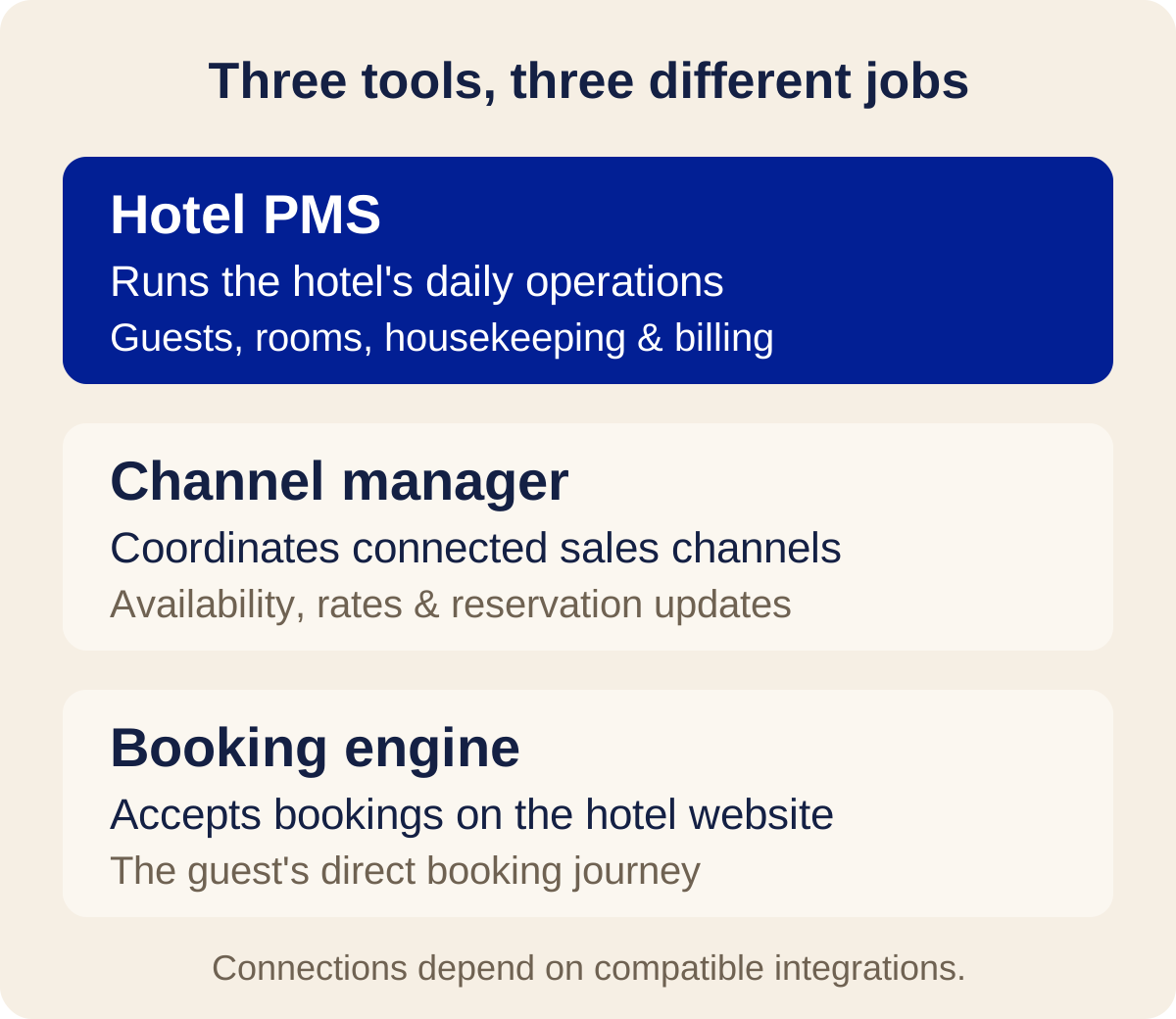
These products may come from one supplier or different suppliers. Integration is what allows them to exchange information; it should not be assumed from a logo on a sales page.
Ask exactly which data travels in each direction, how cancellations and changes are handled, and what happens when a connection fails. Synchronization can reduce manual work, but no integration should be treated as an unconditional guarantee against overbooking.
Diyafa Cloud does not include a built-in channel manager. We offer free support in connecting compatible channel managers and other third-party providers, subject to technical compatibility and the required API access. That does not mean every OTA or provider is already connected.
Cloud PMS vs Traditional or On-Premise PMS#
A cloud PMS is hosted by a provider and accessed over a network, commonly through a web browser. An on-premise PMS runs on infrastructure managed at the property or within the hotel's own environment.
Cloud systems can make remote owner access and shared staff access easier to arrange. They can also shift software deployment and updates away from a local hotel server. However, the provider's service availability, internet connectivity and support arrangements still matter.
On-premise systems may suit properties with particular infrastructure or operational requirements. They also require a clear plan for equipment, maintenance, backups and remote access. Neither hosting model makes a product automatically secure or reliable.
Before deciding, ask:
- What can staff do if the internet or service is unavailable?
- Who maintains backups, and what is the recovery process?
- Can we export reservations, guest records and financial records in a usable format?
- How are staff permissions and account access managed?
- What support is available during our operating hours?
Do not assume that a browser-based PMS has an offline mode. Confirm the provider's actual behavior and keep an appropriate contingency process for reception.
What Features Should You Look For?#
Start with a short list of tasks your property performs every week. Then ask the supplier to demonstrate those tasks with sample data instead of showing only a dashboard.
Use this practical checklist:
- Inventory: Room categories, physical room allocation, maintenance blocks and bed inventory if needed.
- Reservations: Date changes, cancellations, extensions and group bookings if these are part of your operation.
- Front desk: Clear arrival and departure lists, straightforward check-in and check-out, and access to the booking's payment position.
- Housekeeping: Room readiness states, responsibility for updates and visibility at reception.
- Billing: Deposits, extras, invoices and company or agency accounts where required. Confirm local tax and invoicing requirements with the appropriate adviser.
- Reporting: Understandable occupancy and revenue views, balances and booking sources, with clear date filters and definitions.
- Staff access: Permissions that match actual responsibilities. A cleaner, receptionist and owner do not necessarily need the same access.
- Connections: Written confirmation of required integrations, supported data flows, access requirements and third-party charges.
- Onboarding and exit: A realistic migration plan, staff training, support contacts and usable data exports.
A useful demo scenario is a paid deposit followed by a room move and an extension. Add an extra charge, complete check-out, and inspect both the invoice and the owner report. This exposes gaps that a polished sales presentation may not show.
How Much Does a Hotel PMS Cost?#
There is no single standard price for a hotel PMS. Compare the scope of an offer and its total operating cost rather than looking only at the headline subscription.
Pricing structures you may encounter include:
- A fixed subscription: A monthly or annual charge for a defined package.
- Inventory-based pricing: Charges influenced by room count, bed count or property size. Confirm what happens when inventory changes.
- Tiered or quote-based plans: Different features or services at different levels, sometimes priced through a sales consultation.
- Booking-linked fees: A charge linked to booking value or activity, possibly alongside a subscription.
- Licensing and maintenance arrangements: For some traditional deployments, licensing, equipment, updates and support may be separate costs.
Provider pages illustrate why a written quote matters: Cloudbeds offers tailored pricing, while Little Hotelier's pricing page describes plan-specific subscription and booking-fee arrangements. These are examples of pricing structures, not a market price range; check each provider's current terms for your property and region.
Also ask about setup, migration, training, additional modules, API access, channel management and payment processing. OTA commissions and payment-provider fees are separate from a PMS subscription unless an agreement explicitly says otherwise.
Request a written breakdown for your property, including taxes and contract terms. A lower subscription is not necessarily a lower total cost if essential services sit outside the package.
Is There a Free Hotel PMS?#
Yes. A PMS can be offered without a subscription fee, but owners should check what “free” means: a time-limited trial, a restricted plan and a currently free product are different offers.
Diyafa Cloud is currently completely free to use, including our support in connecting compatible providers. There are no subscription fees from Diyafa Cloud at this time.
We are working closely with independent hotels to improve the platform and learn what properties need most. We may introduce paid plans in the future, but we will communicate any pricing changes clearly and well in advance. This is not a promise of free service forever.
Third-party providers may charge their own fees for services, integrations or API access. An optional hotel booking website is a separately quoted project; it is not included in the free PMS offer.
You can read the current free offer and pricing explanation on our landing page.
Introducing Diyafa Cloud#
Diyafa Cloud is a web-based PMS built for independent hotels, boutique hotels, riads, hostels and lodges that want one connected view of their daily operation.
It brings together reservations and availability, arrivals, in-house guests, departures, check-in and check-out, housekeeping, guest records, billing and operational reporting. Hostel bed inventory is supported alongside room-based inventory.
For properties that work with businesses and travel agencies, company and agency Cardex records connect contacts with reservations and account billing. Owners can review hotel performance without relying only on front desk handovers.
Explore the product workflows and owner reporting. The dashboard figures on our landing page are illustrative, not published customer results.
If you already use a channel manager or another provider, tell us its name so we can assess compatibility. If you want a booking website connected to the PMS, request a separate quote; we will confirm the scope and connection requirements before making commitments.
To get started, tell us about your property. Our team reviews enquiries and contacts you to discuss onboarding. There is no public self-registration.
Frequently Asked Questions#
What does PMS stand for in hotels?#
PMS stands for property management system. In a hotel, it is software used to organize reservations, room inventory, guest stays and related operational and billing tasks.
Is a hotel PMS the same as a booking engine?#
No. A booking engine lets guests make direct reservations, usually through a hotel's website. A PMS manages the reservation and the property's internal operation. Automatic transfer requires a supported connection.
Can a small hotel or riad use a PMS?#
Yes. A small property can use a PMS to keep availability, guest details and balances organized. Choose a system that fits your inventory and workflows; room count alone does not determine the right product.
Does every PMS connect to Booking.com or Airbnb?#
No. Connections depend on the PMS, the distribution provider, technical compatibility and access permissions. Ask for confirmation of your specific setup rather than assuming all channels are included.
Can a PMS process guest payments?#
Some can through supported payment-provider integrations. Others record payments without processing them. Confirm supported providers, transaction fees and settlement terms before relying on online payment collection.
Can I access a cloud PMS outside the hotel?#
Usually, with an authorized account and a suitable internet connection, subject to the provider's access rules. Confirm device support, permissions and any network restrictions with your supplier.
Is Diyafa Cloud free forever?#
No lifetime-free promise is being made. Diyafa Cloud is currently completely free to use, and future paid plans may be introduced with clear advance notice. Third-party provider fees and separately quoted booking websites are not included.
How should I choose my first hotel PMS?#
List your essential workflows, test them in a demo, verify integrations and ask for a complete cost breakdown. Include reception and housekeeping in the evaluation: they will use the system during real shifts.
Your Next Step#
Choose a PMS by following a reservation from booking to check-out, not by comparing feature counts alone. If the system keeps inventory, staff updates and billing connected throughout that journey, you have a stronger basis for deciding whether it fits your hotel.
Contact Diyafa Cloud about your property to discuss your needs and the current free PMS offer.